Anchor Alarm Pro: the manual
An anchor watch does one thing: it tells you when the boat is no longer where you left it. This is how to set one up, what it does while you sleep, and what to check if it ever seems quiet when it should not be.
Before the first night
Four things decide whether an alarm can actually wake you. The watch screen warns you about each one, but it is worth setting them once and forgetting them.
- Notifications: on. Without them a drag alarm has no way to reach the lock screen.
- Location: on. On iPhone, "While Using" is enough: an armed watch keeps its GPS when the phone goes in a pocket. On Android, allow it in the background too, or the watch can stop when the screen goes off.
- Volume up, and not muted. Settings shows a live meter of what the alarm will play at. On iPhone you can also turn on "Override silent & Focus", which lets the alarm through the mute switch and a Focus. iOS asks for that permission separately.
- Android: allow the app to ignore battery optimisation when it asks. Without it the system can suspend the watch overnight.
Setting the watch
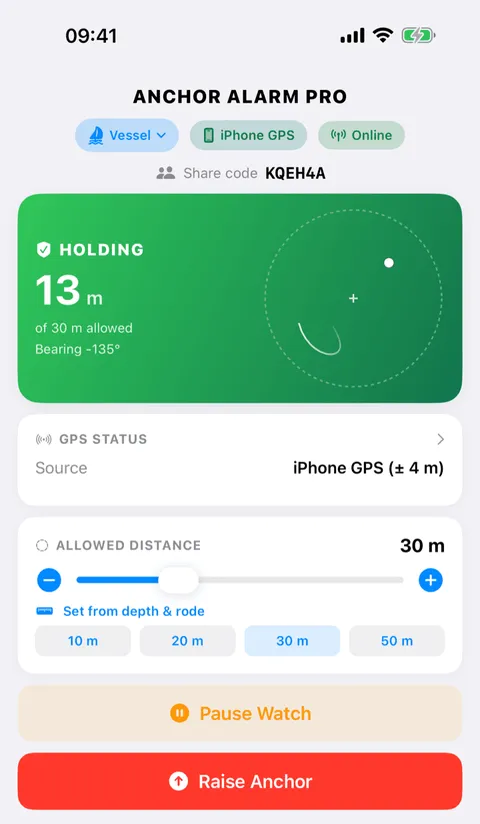
Drop the anchor, let the boat settle back on its chain, then open the app and choose Set Up Watch. Six scenarios cover the usual ways of lying:
- At anchor - the ordinary case: a circle around the anchor.
- Restricted room - a circle plus allowed bearings, for when only part of the swing is safe.
- Mooring buoy - a small circle around the buoy.
- Bahamian moor - two anchors, little swing.
- Stern lines ashore - a corridor between the anchor and the shore, not a circle.
- Custom area - draw the safe water yourself.
Then place the anchor: at your current position (the usual choice, taken the moment you tap), by coordinates, or on the map. Coordinates can be typed the way a chart writes them, 43°07.4074'N, or as plain decimal degrees.
If the anchor is already down and in the wrong place on the map, tap Move: drag it, nudge it a metre at a time, or type the position.
How big should the circle be?
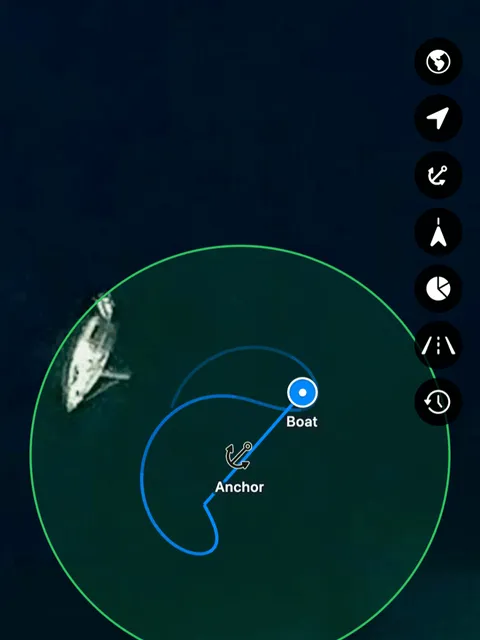
The radius has to cover the rode you have out, plus the length of the boat, plus what the GPS itself is unsure about. Set from depth & rode does that arithmetic: give it the depth and the scope you veered and it proposes a radius. The default is 15 m, so set it to suit your rode.
Too small and a wind shift wakes you for nothing. Too large and the boat is aground before anything sounds. If in doubt, watch the track for an hour: the app draws where the boat has actually swung.
Allowed bearings, and areas to stay out of
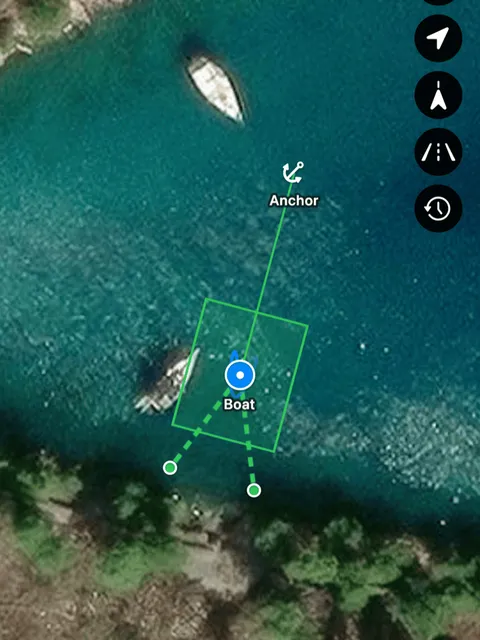
A circle is often too generous. Two tools narrow it:
- Allowed bearings restrict the swing to an arc: set the centre bearing and how wide the arc is, plus a small free-swing circle around the anchor. An arc across north, say 300 through 030, is fine.
- No-go areas are shapes cut out of the safe water: the rock to leeward, or the boat that anchored too close after you settled. Draw one on the map and the alarm treats it as out of bounds, however safe the circle says it is. Up to three.
Where the position comes from
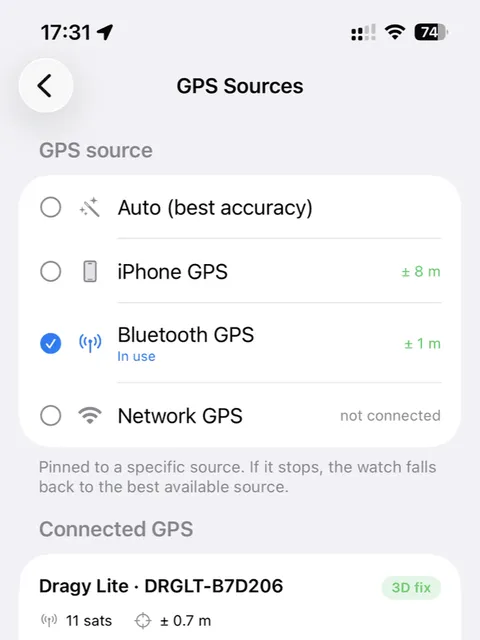
The phone's own GPS is the default and is usually enough. The app can also take a position from a Bluetooth receiver (Dragy and other u-blox units), from the boat's own instruments over NMEA on the network (TCP, UDP, presets for Vesper and Digital Yacht), or from Signal K. Add them under Settings > GPS Sources. The watch falls back to the phone if an external source goes quiet, and says on the card which one it is using.
Sending the watch to MQTT
If the boat has an MQTT broker, the app can send the watch to it, for your own dashboards and tools. Turn it on under Settings > MQTT on the boat's phone: that is where it runs, and it is off by default. Enter the broker's host and port, plus a username and password if it needs them. TLS moves the port from 1883 to 8883.
The default base topic is anchoralarm, and you can change it. Under it the app sends:
status:onlineoroffline.navigation/anchor/position: where the anchor is, as JSON.navigation/anchor/maxRadius: the alarm radius, in metres.navigation/anchor/currentRadius: how far the boat is from the anchor, in metres, while the watch is armed.navigation/position: where the boat is, as JSON.notifications/navigation/anchor:normal,warnoralarm, in the JSON fieldstate.state: all of it in one JSON message, withwatch(armed,pausedoridle) and the timets. It repeats every minute.
The app only sends. Nothing on the network can change the watch.
If the phone dies, status can read online for a short while, until the broker notices. Tools should treat an old ts in state as offline.
A self-signed broker certificate is not supported yet. Use plain port 1883 on a private network. An address outside the boat's network needs TLS.
Watching from ashore
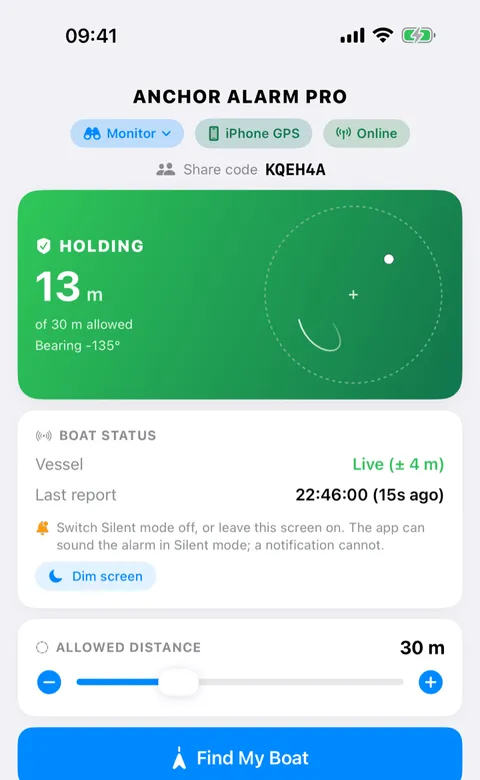
Every watch has a share code. Enter it on another phone (or open the web watch in a browser) and that device follows the boat and receives the same alarms. Use Send Test Alert to Monitors in Settings to prove it: it now reports how many devices it actually reached.
By default a monitor only watches. If you turn on Allow remote control on the boat, a phone ashore can also arm and stop the watch, pause it, move the anchor and change the radius. Every such change is confirmed first, and the boat is told what happened.
What happens when the boat drags
The alarm starts quietly the moment the boat crosses the line and rises to full volume over about thirty seconds, so somebody awake can deal with it before it wakes the whole boat. A short excursion that comes straight back does not raise a confirmed alarm; twenty seconds outside does. Monitors are pushed the same alarm.
Snooze silences it for five minutes and keeps the watch running. Pause stops the alarm and keeps the anchor and the zone. Raise Anchor ends the watch.
Separately from dragging, the app chimes if the phone's battery falls to 10%, or if it has had no GPS fix (or, ashore, no report from the boat) for ten minutes.
Overnight, and battery
The watch is designed to run all night on a phone that is not plugged in, but a full night of GPS is real power. Charge if you can. Battery Saver in Settings uses coarser GPS while the boat is holding, and switches back to full precision near the edge of the zone, while dragging, or when charging.
If something looks wrong
- No alarm sounded. Check the four warnings on the watch card. A muted phone or a Focus is the usual answer.
- No map. Update to the current version; very early builds had a broken map key.
- Android: the anchor vanished from the notification area. The watch puts it back within fifteen seconds. If the watch itself stops when you clear all apps, allow the app to ignore battery optimisation.
- The test alert never arrived. The monitor phone has to have opened the app, joined the share code, and allowed notifications.
- The alarm goes off in a wind shift. The radius is probably too small for the rode you have out, or the anchor was dropped somewhere other than where it actually lies. Move it.
Getting help
Settings > Send Feedback reaches us from inside the app, and anchor@blanck.hk works too. What helps most: the phone, the app version, and what the watch card was showing at the time.